
ZoomText Keyboard

Vispero CanadaSKU: AI900669

Price:
Sale price$175.00

Description

ZoomText Large-Print Keyboard | Two High-Contrast Colour Options in Canada.

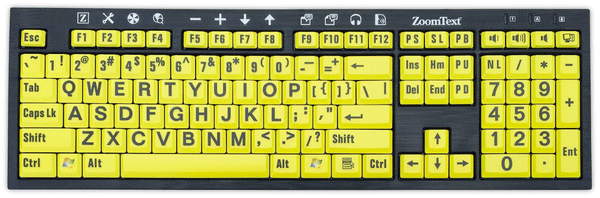
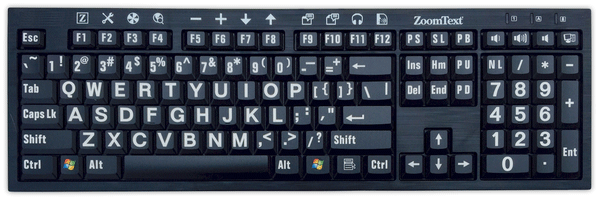
Make keyboard lettering easier to see with large, 36-point labels and a high-contrast colour scheme. The ZoomText Large-Print Keyboard is designed for people who find standard keyboard lettering difficult to read.

Choose black letters on yellow keys or white letters on black keys to suit your visual preferences.

Quick access to ZoomText features.  ZoomText software not included.  See

With compatible ZoomText software, the F1–F12 keys also provide shortcuts to frequently used features. Press and hold a function key to activate its assigned command, such as changing magnification, adjusting screen enhancements, or launching AppReader or DocReader.

The feature keys can also be reassigned to other supported commands, including opening an application, document, or web page.

Before you buy

The ZoomText shortcut features require compatible software. Confirm compatibility with your software version before ordering.

Before publishing, verify the exact supported ZoomText and Fusion versions and whether software is included or sold separately. I wouldn’t retain “Fusion version 9.03 or greater” without checking it.⠋


ZoomText Keyboard - Black Keys with Large White Letters, or Yellow Keys with Large Black letters. 

Designed for anyone who struggles to see the lettering on their keyboard, the ZoomText Large-Print Keyboard makes typing faster and easier than ever before. Each key and button label is easy to see, even in low light, thanks to its 36-point text and high-contrast color scheme.

The ZoomText Large-Print Keyboard also provides quick access to ZoomText features. The F1 through F12 keys perform double duty. When you press and hold a function key, its assigned ZoomText command is triggered. The commands allow you to instantly start ZoomText, change magnification levels, toggle screen enhancements, launch AppReader and DocReader, and more, all without having to memorize hotkeys.

You can even reassign each feature key to your choice of ZoomText commands, Internet and multimedia commands, or to open an application, document or web page.

  • Color: Black Letters on Yellow Keys or White Letters on Black Keys

  • ZoomText Magnifier, Magnifier/Reader, Fusion version 9.03 or greater

  • 1 year warranty

You may also like

Recently viewed